
No-code is enough when your website fits inside the platform's published limits and you're happy to stay on that platform for good. You need custom code when you'd outgrow those limits, need logic the platform can't run, or want to be able to leave cheaply. Read the vendor's pricing page and export page before you read any feature list.
Most comparisons of no-code and custom code argue about cost and launch time, with rough estimates of weeks against months. The facts that decide it for a business are already written down by the vendors themselves: how many pages and content items each plan holds, and what you can take with you when you go. Few of those comparisons quote them, so this one does.
What is the difference between a no-code and a custom-coded website?
A no-code website is built and hosted inside a platform such as Framer, Webflow or Wix: you design visually, and the vendor runs the software. A custom-coded website is written by developers in a framework of their choice and can be hosted anywhere. The main difference is who sets the limits: the vendor or you.
On a no-code platform, the vendor decides how many pages you get, how much content the CMS holds, which integrations exist and where the site can live. With a site built in code, those limits come from your budget and your developers instead. Neither is better in the abstract. A bakery with eight pages and a blog will never touch a ceiling; a retailer with 50,000 product records is past every standard plan listed below.
When is a no-code website enough?
No-code is enough when your content fits comfortably inside the plan's limits for the next two or three years, the features you need are ones the platform already offers, and your team wants to edit without a developer. For most brochure sites, portfolios and small blogs, all of that holds, and a no-code build launches faster.
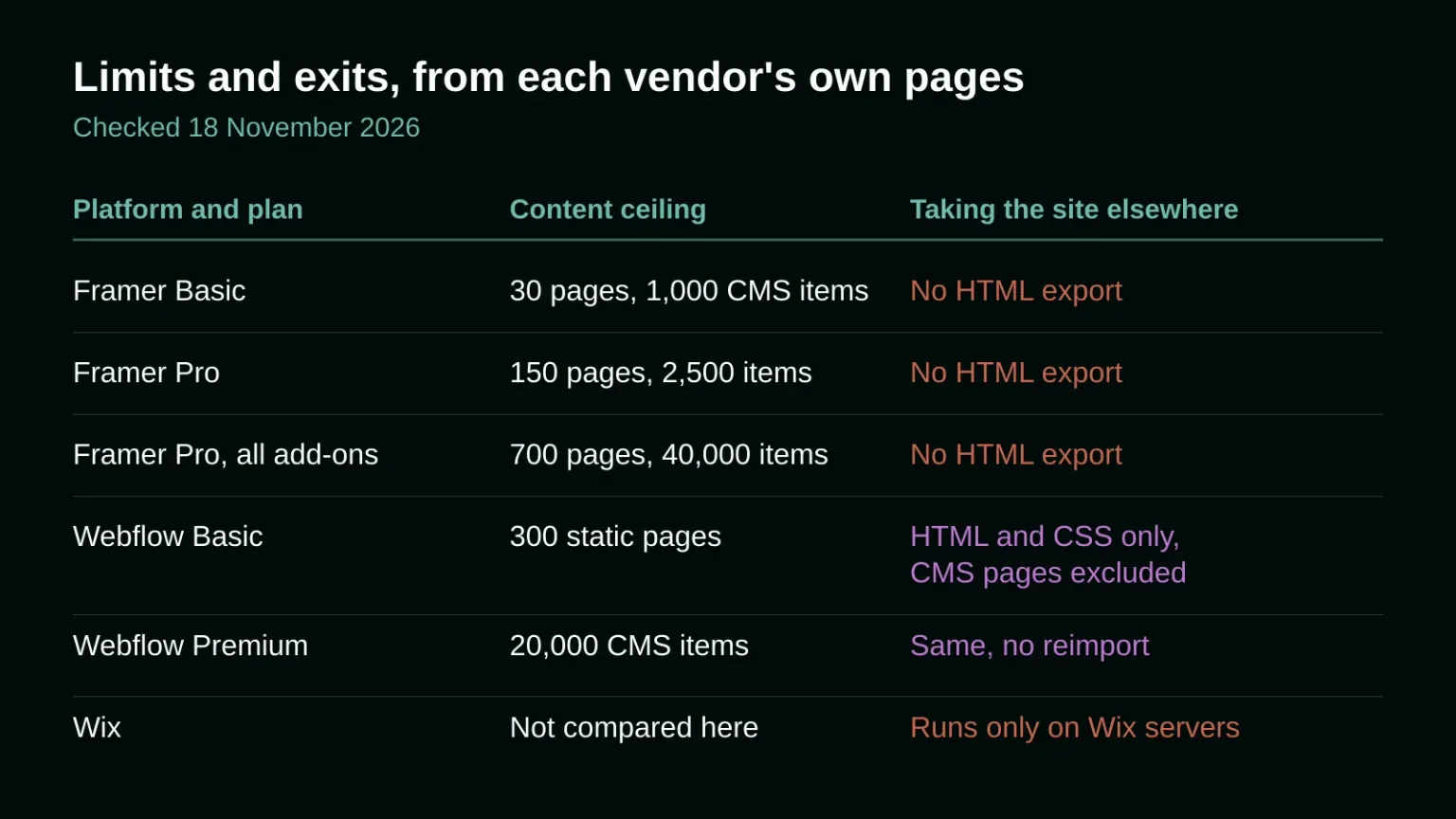
The limits are published, so check them against your own numbers. Framer's pricing page lists 30 pages, 2 CMS collections and 1,000 CMS items on its Basic plan, and 150 pages, 10 collections and 2,500 items on Pro. Paid add-ons take Pro to at most 700 pages, 40 collections and 40,000 items. Above that, Framer points you to an Enterprise plan with custom limits.
Webflow changed its plans on 13 May 2026. It merged its CMS and Business plans into one Premium plan at $25 a month billed yearly, with 20,000 CMS items and 40 collections included. Its Basic plan, at $15 a month billed yearly, is described as being "for simple sites that don't need a CMS" and holds 300 static pages.
Count what you'll have in two years. A CMS item is one record: a blog post, a team member, a job opening, a product. Twenty posts a year, a team page and a list of offices stay far below any of these ceilings. A catalogue of 30,000 products already passes the 20,000 items of Webflow Premium.
What happens when you outgrow a no-code platform?
You rebuild. None of the three big builders lets you lift a finished site out and keep running it elsewhere as it is. Framer offers no HTML export, Wix sites must run on Wix's servers, and Webflow exports HTML and CSS but not its CMS pages. Your content can usually leave; the working site stays behind.
Comparisons rarely quote these pages, yet they hold the biggest cost of no-code. Framer's help center says published sites "are not fully static and cannot be exported as standalone HTML files for self-hosting", and adds that Framer may not suit you if you need control over hosting or the source code. Wix says your site "needs to be hosted and operated on Wix's servers", while stating that the content you build there belongs to you.
Webflow goes further than the others. Its pricing page says you can export the site and host it anywhere with a paid Workspace plan. The details narrow that down: "Dynamic content (CMS items/pages) can't be exported", CMS content has to be exported collection by collection, and forms stop working. Exported code can't be brought back into Webflow either.
So think of a no-code platform as a long lease. That's fine for many businesses. Just price the move before you sign: if you might need to leave in three years, the rebuild belongs in today's budget comparison.
When do you need custom code?
You need custom code when the website has to run logic of its own: a price calculator tied to your own data, customer accounts, a booking flow linked to internal systems, or thousands of generated pages. You also need it when you must choose your own hosting, or when the platform's ceiling sits below your two-year plan.
The warning signs show up early. Someone asks for "just one" integration the platform's app store doesn't have, and the answer is a pile of third-party embeds. Content gets split across workarounds because one collection hit its cap. Translation costs climb by the language: Framer, for example, lists localization as an add-on priced at $20 per locale. Each of these is solvable on a platform. When several stack up, it's time to price a coded site.
Custom code isn't free of upkeep. Someone has to update dependencies, watch the hosting and fix what breaks, which is the trade-off covered in our comparison of static sites, WordPress and website builders. What you get in exchange is a site you can move, extend and hand to any developer.
Can you mix no-code and custom code?
Yes, and it's often the sensible middle. Keep the marketing pages on a no-code platform where your team edits them, and build the parts that need logic in code, on a subdomain or behind an API. Webflow's REST API, for instance, lets code add, update and remove items in its CMS.
The split works when each side does what it's good at. A product team can ship a customer portal in code while marketing changes the home page every week without filing a ticket. The opposite split is also common: a coded site that pulls its articles from a separate content service, which is what a headless CMS does. Either way, write down which system owns which page, or two teams end up editing the same thing in two places.
How to decide for your own website
Four checks settle most cases.
- Count your content two years out. Pages, posts, products, locations, languages. Compare the totals with the plan page of each platform you're considering.
- List what the site must calculate or connect to. Anything tied to your own database or internal tools is a strong pull toward code.
- Read the export page before the feature page. Decide whether you could live with a rebuild if you ever leave.
- Name the person who edits. If it's someone without a developer at hand, the visual editor of a no-code platform is a real advantage, and a coded site needs a content editor added.
If every answer points the same way, you have your decision. If they split, the mixed setup above is usually the answer. onlyspell offers both: development in code and on no-code platforms. Bring your content counts and talk to us about your website to hold them against the plan limits.
Frequently asked questions
Is a no-code website bad for SEO?
Not by itself. Framer lists built-in SEO on its Basic plan and site redirects on Pro, and Webflow describes its sites as SEO-friendly. Your content and how fast and usable the pages are matter more than which tool produced them.
Can I move a no-code website to custom code later?
Yes, but plan to rebuild the site. Framer has no HTML export and Wix sites only run on Wix servers, while Webflow exports HTML and CSS without its CMS pages. Your text, images and CMS records can usually be exported and reused in the new site.
How many pages can a no-code website have?
It depends on the plan. As of November 2026, Framer lists 30 pages on Basic and 150 on Pro, up to 700 with add-ons, and Webflow's Basic plan holds 300 static pages. CMS items such as blog posts are counted separately, up to 40,000 on Framer Pro with add-ons and 20,000 on Webflow Premium.
Sources
If you still need additional help in developing and designing your website, our magic is here to help. Contact us today, and our wizards will help you immediately with your digital marketing needs!