
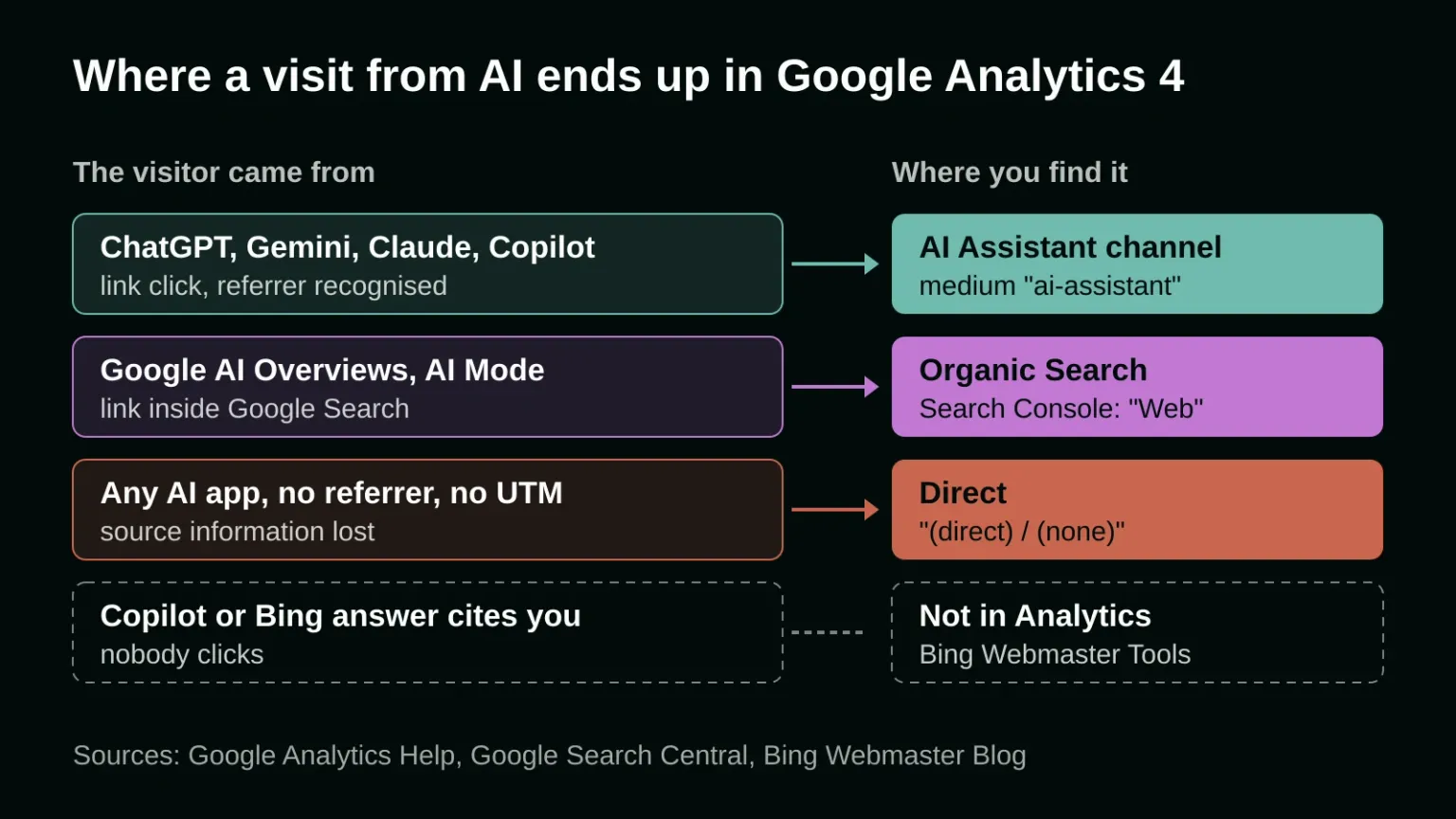
Google Analytics 4 now tracks traffic from ChatGPT and other AI assistants on its own. Since May 13, 2026, visits whose referrer matches a known AI assistant get the medium "ai-assistant" and land in a new AI Assistant channel, so you no longer need a hand-built regex to see them. Two gaps remain: clicks from Google's own AI Overviews still count as Organic Search, and visits that arrive without a referrer show up as Direct.
Most guides that rank for this question were written before that change and walk you through building a custom channel group. That still works, but it's no longer step one. What follows is how to read the built-in channel, where AI visits hide outside it, and how to measure the part that never becomes a click. Measuring this is the dull half of being visible in AI answers, the half that organic search and AI visibility work depends on to know whether anything changed.
Can Google Analytics 4 track ChatGPT traffic?
Yes. Google added an AI Assistant channel to the default channel group in May 2026. When a visitor clicks a link in ChatGPT, Gemini, Claude, Copilot, Grok or Deepseek and the browser passes the referrer along, Analytics sets the medium to "ai-assistant", the campaign to "(ai-assistant)" and files the session under AI Assistant. Nothing needs to be configured.
In the Acquisition reports, look at the default channel group. If AI Assistant isn't in the list, you simply had no recognised visits in that date range. To see which assistant sent each visit, add the source as a second dimension, or filter the medium to exactly "ai-assistant".
Two details are easy to miss. Google's channel rules match the referrer against "a list of AI Assistants" that it doesn't publish in full, so check your own source list for assistants it doesn't name, such as Perplexity. And the release note doesn't say whether the channel was applied to data from before May 13, 2026, so compare months on either side of that date with care: a jump in June may just be the new label arriving.
Why doesn't Google's AI Overviews traffic show up in the AI Assistant channel?
Because Google counts it as search. The AI Assistant channel excludes AI Overviews and AI Mode. A click from either comes from Google Search, so the Organic Search rule picks it up like any other Google result. Search Console, Google says, counts them in the Performance report under the "Web" search type.
For a business that gets most of its search traffic from Google, this is the bigger blind spot. Gemini, the chatbot, sends AI Assistant visits; the AI answer sitting on top of Google's results page sends Organic Search visits. If you're watching the AI Assistant channel to judge your AI visibility, you're seeing the smaller share. The closest you can get from Google's own tools is to watch the pages and queries in Search Console that you know trigger an AI Overview and follow their clicks over time. Our article on what AI Overviews change for your traffic covers what Google has said about those clicks.
Why does some AI traffic show as Direct?
Analytics needs a referrer or a UTM tag to know where a visit came from. When neither arrives, Google's help page says the session is recorded as "(direct) / (none)", which means traffic "that doesn't have a clear referral source." A link pasted into the address bar, opened from a PDF, or marked rel="noreferrer" arrives without that information.
The noreferrer case is mechanical. MDN's documentation says the attribute tells the browser to "omit the Referer header" when it follows the link. With no referrer and no tag, the AI Assistant rule has nothing to match, and the visit joins the people who typed your address or opened a bookmark. Google's list of causes also names URL shorteners, redirects that drop parameters, and ad blockers.
You can't recover those visits after the fact, but you can make them easier to spot. A rise in Direct sessions that land on a deep page, say a pricing page or a single article rather than the home page, is worth a look. People rarely type a long URL by hand. Compare which deep pages gain Direct visits with which pages gain AI Assistant visits in the same weeks. When the same pages move together, part of that Direct traffic is probably AI traffic that lost its label.
Do you still need a custom channel group?
Only if the built-in channel doesn't fit how you report. A custom group helps when you want one assistant reported apart from the rest, or when your source list shows an assistant the AI Assistant channel misses. If you built one before May 2026, run it beside the default group for a month and compare the totals.
If they match, retire the custom group and stop maintaining a list of domains by hand. For links you place yourself, for example in a newsletter, a social profile or a partner's site, add UTM tags. A tagged link survives where a referrer doesn't, and the campaign name tells you exactly which link worked.
How do you measure AI citations that never get a click?
Analytics only sees visits, and an AI answer can name your business without anyone clicking. For Microsoft's side there is now a direct measure: since February 10, 2026, Bing Webmaster Tools has an AI Performance report that shows how often your pages are cited as a source in Microsoft Copilot, AI summaries in Bing and some partner integrations.
It reports total citations, the average number of your pages cited per day, citations per URL, and a sample of the grounding queries the AI used to find your content. In June 2026 Bing added citation share, the percentage of all citations for a grounding query that go to your site. The report covers Microsoft's surfaces only; ChatGPT and Gemini answers aren't in it, and Google's tools don't count citations either. For those, the honest method is still manual: ask the questions your customers ask and record whether you're cited, which is what our guide to getting cited in AI answers suggests doing every month.
Put the three sources side by side once a month: AI Assistant sessions and their conversions in Analytics, the deep-page Direct sessions, and citations in Bing Webmaster Tools. Each covers a gap in the others. Analytics shows who clicked, the Direct gains on deep pages hint at visits that lost their label, and Bing shows where you were named and nobody clicked.
If you'd like onlyspell to set up this reporting for your site and connect it to the pages that matter for your sales, tell us about your website.
Frequently asked questions
What is the AI Assistant channel in Google Analytics 4?
It's a default channel Google added on May 13, 2026. Visits whose referrer matches a recognised AI assistant, such as ChatGPT, Gemini or Claude, get the medium "ai-assistant" and are grouped in this channel automatically. Google's own AI Overviews and AI Mode are excluded and count as Organic Search.
Why is ChatGPT traffic showing as Direct in GA4?
A visit is recorded as Direct when it arrives without a referrer or UTM tag. That happens when a link is pasted into the address bar, opened from a document, or carries rel="noreferrer", which tells the browser not to send the referrer. Analytics then has no way to tell that the visit came from ChatGPT.
Can I see how often AI answers cite my website?
For Microsoft Copilot and Bing's AI summaries, yes: the AI Performance report in Bing Webmaster Tools, launched February 10, 2026, counts citations per page. Google Analytics only counts visits, and Bing's report doesn't cover ChatGPT or Gemini answers. For those, checking your key questions by hand each month is the practical option.
Sources
- Google Analytics Help: What's new in Google Analytics (May 13, 2026: New AI Assistant traffic measurement)
- Google Analytics Help: Default channel group
- Google Analytics Help: Traffic-source dimensions
- Google Search Central: AI features and your website
- MDN Web Docs: rel="noreferrer"
- Bing Webmaster Blog: Introducing AI Performance in Bing Webmaster Tools Public Preview
- Bing Blog: New AI Visibility Insights in Bing Webmaster Tools
If you still need additional help in developing and designing your website, our magic is here to help. Contact us today, and our wizards will help you immediately with your digital marketing needs!