
A business website needs four kinds of care after launch: software updates and backups, renewals that expire on a fixed date (the domain, the security certificate, paid services), regular tests of the parts that bring in leads, and content that keeps up with the business. How much of each it needs depends on how the site was built. A WordPress site with a dozen plugins needs updates every few days, while a static site built in code mostly needs the renewals and the tests.
Why doesn't a generic website maintenance checklist fit every site?
Most checklists that rank are written by hosting companies, for WordPress sites on their own servers. They put about 20 tasks on one calendar for every site. A site built in code or on a website builder breaks in different ways, so half of that calendar either doesn't apply or comes too late.
Read the top results side by side and the pattern is easy to see. DreamHost's list has 20 tasks, and its weekly section alone asks for backups, comment moderation, plugin updates and malware scans. Bluehost's guide sells its own plans along the way. Process Street's setup steps assume root access and SSH on a hosting account. That's sound advice for a self-managed WordPress install, and close to useless for a site that has no plugins and no admin login on the public server.
A more useful way to build the list is to ask what makes each task necessary. Three things do. Your own software changes, and some of it develops holes. The outside world has dates: certificates, domains and subscriptions run out. And the business itself changes, so prices, team pages and opening hours go stale. Which of the three weighs most on your site comes down to how it was built, which is also the main difference between the options in website development. If you're still choosing, our comparison of a static site, WordPress or a website builder covers that choice.
What does website maintenance include for each type of site?
On WordPress it starts with plugin and theme updates, because that's where nearly all the security problems are. A site built in code needs planned dependency updates a few times a year. A builder updates itself, so the owner's list shrinks to renewals, forms, integrations and content. Backups matter for all three.
WordPress and other plugin-based sites
Patchstack, a company that tracks WordPress vulnerabilities, counted 11,334 new ones in 2025, 42% more than in 2024. 91% were in plugins and 9% in themes; WordPress core had only six, all low priority. Two more figures from the same report change how often updates should happen. 46% of the vulnerabilities were not fixed in time for public disclosure, and the weighted median time to the first exploit was five hours.
Five hours makes a monthly update session too slow for the plugins that matter. In practice that means automatic updates for well-maintained plugins, a backup taken before each update, and fewer plugins overall: every one you delete is one fewer source of the 91%. When a vulnerable plugin has no fix yet, the choice is to switch it off or replace it, and someone has to be watching to make it.
Sites built in code
A static site serves prepared files, so there is no plugin store and usually no database or login page on the public server for an attacker to try. Its code still depends on open-source packages and a framework version, and those age. They get updated in a planned session, tested on a copy of the site and released, a few times a year rather than every few days. Speed deserves a look in the same session, since a new script or a heavy image can slip in with any change; our guide on which Core Web Vitals to fix first shows where to look.
Sites on a website builder
On a builder the platform patches its own software, which removes the biggest item on the WordPress list. What's left is the subscription, the domain, the forms and anything connected to the site, such as a booking tool or a newsletter service. These are also the sites where no-code development makes small changes cheap, so content can be kept fresh without waiting for a developer.
Which website maintenance tasks fail without anyone noticing?
Renewals and forms. A security certificate or a domain that expires takes the whole site offline on a known date, and the reminder emails often go to an address nobody reads. A contact form can keep showing its thank-you message while the emails behind it stop arriving. Neither shows up in a speed or security scan.
Certificates are getting harder to forget about safely. Let's Encrypt, the free certificate authority, stopped sending expiration reminder emails on 4 June 2025 and now points owners to automated renewal and third-party monitoring. At the same time, the CA/Browser Forum, the body of certificate authorities and browser makers, voted in April 2025 to cut the maximum lifetime of a public certificate from 398 days to 47 days in steps between March 2026 and March 2029. The first step is already in force: certificates issued since 15 March 2026 last at most 200 days.
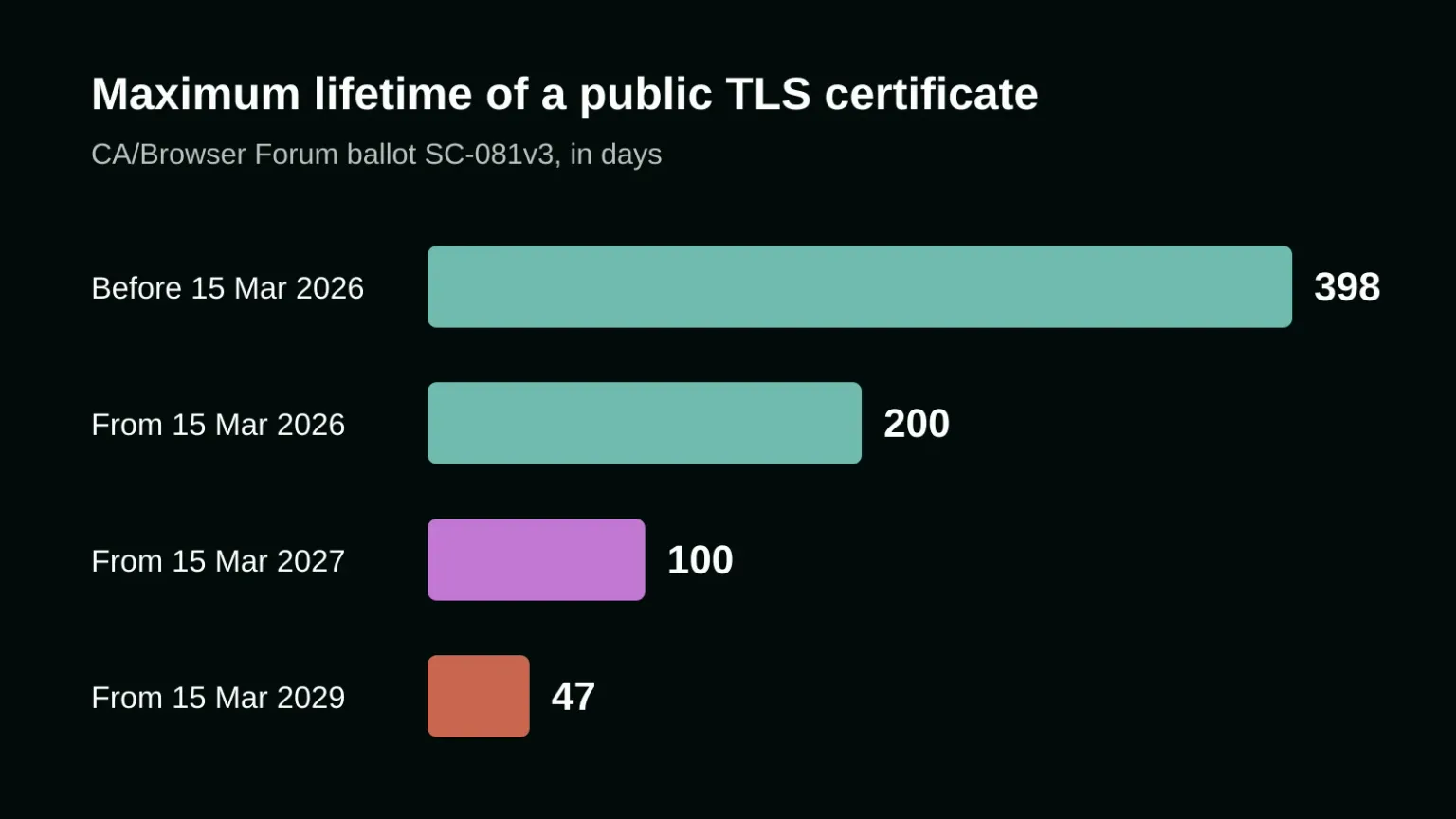
At 47 days, a certificate renewed by hand would need renewing about eight times a year. So the yearly "check the SSL certificate" line that several of the top checklists still carry is out of date. The real task is a one-off: confirm that renewal is automatic wherever the site and its subdomains are served, and add an outside monitor that warns before a certificate runs out.
Domains fail in a quieter way. The registrar sends its reminders to the email on the account, and on many small business sites that is the address of whoever bought the domain years ago: a former employee, a freelancer, the first agency. Turn on auto-renewal, check that the card on file hasn't expired, and put a shared company address on the account.
Forms deserve a real test once a month: fill in every form on the site, as a visitor would, and confirm the message reaches the person who answers it. The same goes for anything a third party runs on your pages: the booking widget, the map, the chat, the payment step, the analytics tag. Any of them can stop working after a change on the other company's side while your own code stays exactly the same.
Google Search Console adds one more safety net for free. Its Security Issues report flags hacked content, malware and pages that trick visitors into something dangerous. It only helps if the account is set up and its messages go to someone who reads them.
Which accounts should the business own after launch?
All of them, in the company's name and on a shared company email: the domain registrar, DNS, the hosting or builder account, the code repository, analytics, Search Console and any email or form service. The agency or developer gets added as a user. Then a change of supplier, or of staff, never locks you out of your own site.
Whoever builds the site, onlyspell included, should hand over this list at launch along with who renews what and when. Keep it with the company's other contracts and passwords, because it's the page you need on the day something breaks.
How often should a website be maintained?
Security updates as soon as they're released, which for WordPress means automatic updates. Then a short monthly round of form tests, a look at Search Console and a backup check, a deeper review each quarter, and a yearly look at content and renewals. A site built in code can space the software part out further.
- As released: security updates for WordPress, plugins and themes, after an automatic backup.
- Monthly: send a test through every form; check Search Console for security and indexing messages; confirm the latest backup exists and isn't empty; look over the third-party tools on the site.
- Quarterly: restore a backup onto a copy of the site to prove it works; update dependencies on a site built in code; check page speed on phones; remove plugins, tags and user accounts nobody needs any more.
- Yearly: confirm auto-renewal and the card on file for the domain and every subscription; check who has access to each account; read every page for prices, team members, addresses and services that have changed.
The restore test is the item people skip most, and the one that matters most on a bad day. Until a backup has been restored once, nobody knows whether it works. Testing it on a copy tells you whether the files and the database actually come back together.
If you'd like a site that needs less of this list to begin with, or a second opinion on the list for the site you have, talk to us about your website.
Frequently asked questions
Does a static website need maintenance?
Yes, though less of it. A static site has no plugins and usually no login on the public server, so the weekly security updates of WordPress don't apply. It still needs its domain and certificate renewed, its forms tested, its code dependencies updated a few times a year and its content kept current.
What happens if I don't update my WordPress plugins?
The site becomes easier to break into over time. Patchstack found that 91% of the 11,334 WordPress vulnerabilities reported in 2025 were in plugins, and that the weighted median time to a first exploit was five hours. Automatic updates for well-maintained plugins, with a backup first, close most of that gap.
Can website maintenance be fully automated?
Much of it can: security updates, backups, certificate renewal, domain auto-renewal and uptime alerts. What still needs a person is checking that those automations worked, restoring a backup now and then, sending a real test through each form and reading the pages for anything the business has changed.
Sources
- Patchstack: State of WordPress Security in 2026
- Let's Encrypt: Ending Support for Expiration Notification Emails (22 January 2025)
- CA/Browser Forum: Ballot SC-081v3, reducing certificate validity and data reuse periods
- DNSimple: SSL certificate validity changes, 2026 to 2029
- Google Search Console Help: Security Issues report
If you still need additional help in developing and designing your website, our magic is here to help. Contact us today, and our wizards will help you immediately with your digital marketing needs!