
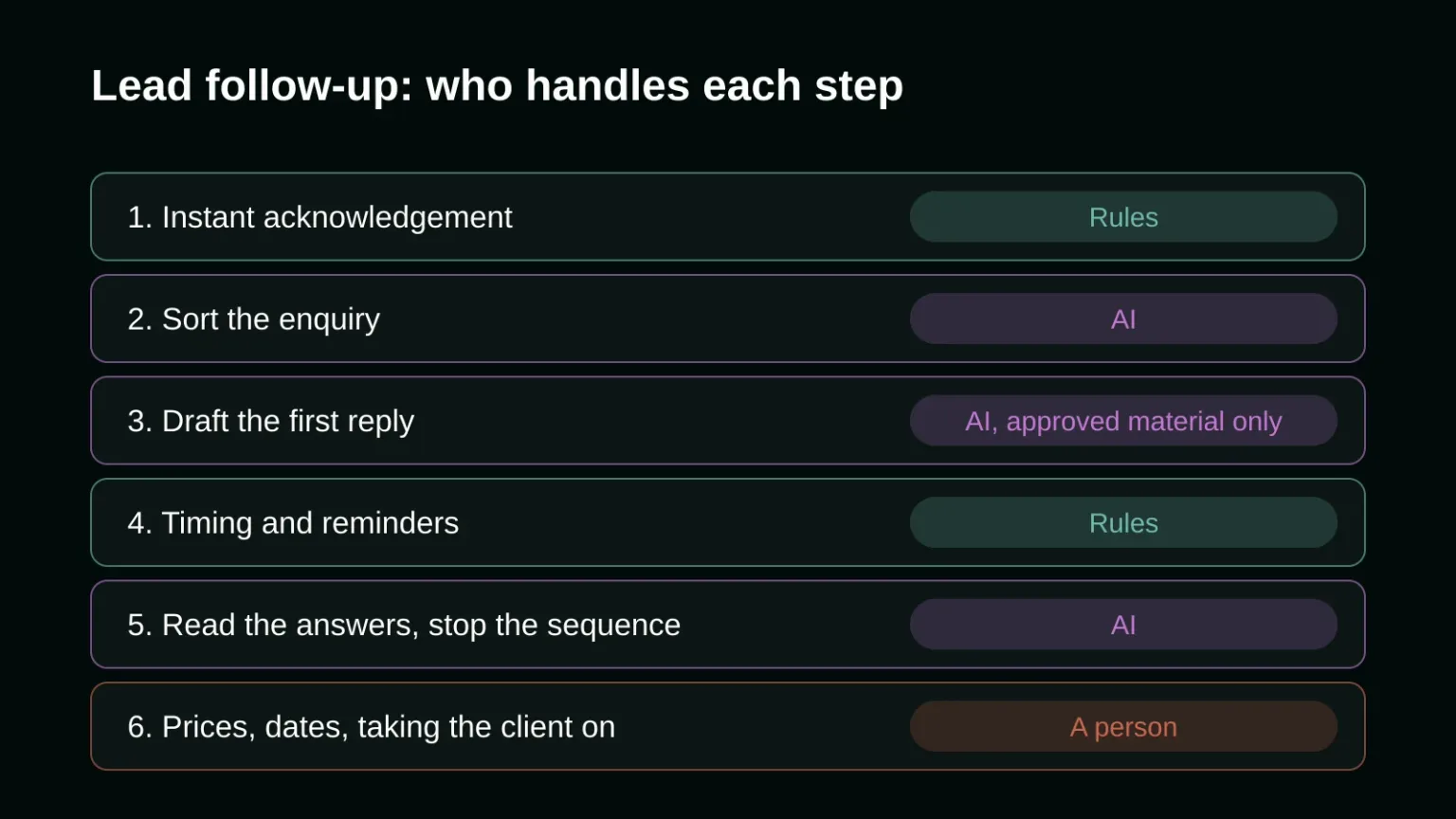
AI is good at three parts of lead follow-up: reading what a new lead wrote, drafting a first reply that answers it, and summarising the conversation for whoever takes over. Fixed rules should handle the timing, the reminders and the moment a sequence stops. Prices, promises and the decision to take a client on stay with a person.
Most guides on AI lead follow-up describe one tool that does everything. That hides the real problem. Most businesses lose leads because nobody answers for hours, and you can fix that with a plain notification and a routing rule before any AI is involved. Split the work into steps and give each one to the right worker. That split is the first decision in any AI automation project for lead handling, and once it's made, the part the AI does turns out small and easy to check.
Why do leads go cold in the first place?
Leads go cold mostly because the first reply comes too late or never comes. In a recent audit of 114 B2B companies, more than 99% did not reply within five minutes. The average personalised email took almost 12 hours, and nearly one in five companies never answered by email at all.
Those numbers come from Workato's lead response time study, published in March 2026, in which the researchers filled out demo requests at 114 B2B companies and timed what came back. Only one company sent a personalised email within five minutes. Only 31% phoned at all, and the average phone response took 14 hours 29 minutes. Workato sells automation software, so it has a stake in the result, but the method is simple enough to check: a form, a stopwatch, an inbox.
The finding that matters most for a small business is the gap between companies with and without a lead routing tool. With one, the average response took 3 hours 32 minutes. Without one, nearly 13 hours. A routing tool is ordinary automation. It decides who gets the lead and tells them. No language model is needed for that.
None of this is new. In 2011, James Oldroyd, Kristina McElheran and David Elkington wrote in Harvard Business Review that "most companies are not responding nearly fast enough." Fifteen years of CRM software later, the audit above says the same thing.
Which parts of lead follow-up can AI take over well?
AI does well wherever the job is reading or writing language: sorting a new enquiry by what the person wants, drafting a first reply from your own approved material, reading a lead's answer to see whether they are interested, and writing a short summary for the person who calls them. It does badly where a wrong word costs money.
Sorting the enquiry
A contact form message like "we need a new booking system before the summer season, budget is flexible, can someone call me Thursday" holds a service, a deadline, a budget signal and a call request. A model can pull those out and file the lead under the right service and urgency, which keyword rules do poorly because people never phrase things the same way twice.
Drafting the first reply
This is where AI pays for itself, and where most of the risk sits. A good draft answers the actual question, in the lead's words, and proposes one next step. Feed it only material you have approved: your service descriptions, your process, your real availability. The same rule applies as when you train an AI chatbot on your business documents: the model should answer from your documents and say it doesn't know when they don't cover the question.
That last part needs a guardrail, because language models tend to fill gaps. A September 2025 paper by Adam Tauman Kalai and three co-authors, "Why Language Models Hallucinate", argues that "training and evaluation procedures reward guessing over acknowledging uncertainty." In a follow-up email, a guess looks like a delivery date you can't meet or a discount you never offered. So the draft should never contain a price, a date or a commitment unless that exact fact is in the material you gave it.
Reading the answers
When a lead replies "not now, maybe in March" or "who is this?", a fixed sequence keeps sending its next email anyway. AI can read the reply, stop the sequence, and tag it: interested, later, wrong person, unsubscribe. Skip this step and the system will one day send a cheerful reminder to someone who already said no.
Handing over to a person
Before a call, a three-line summary of the form, the emails and any website visits saves the salesperson from reading the whole thread. Salesforce's State of Sales survey of 7,775 sales professionals, run in August and September 2022 for the fifth edition of the report, found that reps spend just 28% of their time selling. Summaries are a small, safe way to give some of the rest back.
What should rules and people keep in AI lead follow-up?
Rules should own anything that must happen the same way every time: the instant acknowledgement, who gets notified, when a reminder goes out, when a sequence stops. People should own prices, scope, exceptions and the decision to take a client on. AI may suggest; it should not send any of those on its own.
The instant acknowledgement is a good example. "Thanks, we got your message, Dana will reply by 2pm today" is a template with two fields filled in. It goes out in seconds, it can't hallucinate, and it buys the time a person needs to write a proper answer. Putting a model in charge of it adds cost and risk for no gain.
Timing is the same. Three follow-ups over two weeks, stopping the moment someone replies, is a rule you can read and test. If a model decides when to write, nobody can tell you afterwards why a lead got four emails in two days. Where the line falls between a fixed automation and an agent that makes its own choices is covered in more depth in our article on what AI agents can and cannot do for a business today.
What does automated follow-up do to your email deliverability?
Volume is the hidden cost. Once AI makes writing emails free, the temptation is to send more of them, and spam complaints rise. Gmail requires every sender to authenticate with SPF or DKIM and to keep the spam rate below 0.3%. Above 5,000 messages a day it also requires DMARC and one-click unsubscribe on marketing mail.
The details are in Google's email sender guidelines. The 0.3% limit is measured in Google Postmaster Tools, and the same page advises staying below 0.1%. A small business answering its own inbound leads will rarely send 5,000 emails a day, but the spam rate rule still bites: if follow-ups annoy people into pressing "report spam", your ordinary replies start landing in junk too. Fewer, better emails that stop when someone answers protect the address you use for everything else.
How to set it up without losing control
Start with the parts that need no AI. Make sure every form submission notifies a named person and sends an instant acknowledgement. Measure your real response time for a month. Then add AI to one step, usually the draft of the first reply, and have a person approve each draft before it goes out. Once the drafts are right almost every time, let the simple ones send by themselves and keep approval for anything that mentions money or dates.
Keep a log of every message the system sends and why. When a lead complains, you want to see the email, the material the model used and the rule that triggered it. Plan for the boring failure too: the connection between the form and the CRM breaking without an error, so leads stop arriving and nobody notices.
This is the kind of work our Visionary spell covers at onlyspell: deciding which steps a model should touch and building the rest as plain, testable automation. If your leads wait longer than they should, talk to us about your follow-up process.
Frequently asked questions
Can AI follow up with leads on its own?
It can send routine messages on its own once its drafts have proven accurate, but it shouldn't send prices, dates or commitments without a person checking them. Models tend to guess when their material doesn't cover a question, and in a sales email a guess becomes a promise.
How fast should a business reply to a new lead?
Within minutes for the acknowledgement and within hours for a real answer. In Workato's 2026 audit of 114 B2B companies, more than 99% failed to reply within five minutes and the average personalised email took almost 12 hours, so a fast reply still stands out.
Will automated follow-up emails hurt my email reputation?
They can if people report them as spam. Gmail requires all senders to keep their spam rate below 0.3% and advises staying below 0.1%, and senders of more than 5,000 emails a day must offer one-click unsubscribe. Sending fewer follow-ups and stopping as soon as someone replies keeps complaints low.
Sources
- Workato: B2B Lead Response Times, what we learned from 114 companies (2026)
- Oldroyd, McElheran and Elkington: The Short Life of Online Sales Leads, Harvard Business Review (March 2011)
- Kalai, Nachum, Vempala and Zhang: Why Language Models Hallucinate, arXiv (September 2025)
- Salesforce: State of Sales research (survey of 7,775 sales professionals, 2022)
- Google: Email sender guidelines
If you still need additional help in developing and designing your website, our magic is here to help. Contact us today, and our wizards will help you immediately with your digital marketing needs!